Skip to content
Built for Polymarket

Everything You Need,
One Tool

PolyPlay brings together the most requested features for serious Polymarket users.

PolyPlay features

Background Changer

Customize your Polymarket interface with stunning backgrounds. Choose from curated themes or upload your own to personalize your trading experience.

X Tracker

Track the latest Polymarket bet posts on X in real time. Never miss trending predictions, whale bets, or viral market discussions.

Fear & Greed Index

Gauge the overall sentiment of Polymarket. Our proprietary algorithm analyzes trading patterns, volume, and social data to give you a real time fear & greed score.

Deep Data Analytics

Dive into comprehensive market data, including volume trends, liquidity analysis, top traders, market correlations and historical performance all at your fingertips.

Powerful Data & Analytics

Everything you need to make informed decisions on Polymarket, backed by real data.

  • Volume Analytics

    Track daily, weekly, and monthly trading volumes across all markets with trend analysis.

  • Market Watchlists

    Create custom watchlists to monitor your favorite markets and get alerts on price movements.

  • Market Trends

    Spot emerging patterns with historical odds movement, momentum indicators, and market correlation maps.

  • Risk Assessment

    Evaluate market risk with liquidity depth, spread analysis, and volatility metrics.

  • Whale Tracking

    Follow large bets and smart money movements across Polymarket in real time.

  • Instant Alerts

    Get notified when markets move, new bets land, or sentiment shifts dramatically.

How to Set Up PolyPlay

Get started in four simple steps. Wallet verification comes before PolyPlay opens.

  1. 1

    Show your bookmarks bar

    Ctrl + Shift + B (Windows) or

    ⌘ + Shift + B (Mac)

  2. 2

    Add the bookmarklet to your browser

    The bookmarklet works on desktop browsers only. Safari and mobile browsers are not supported.

    Drag PolyPlay to bookmarks

    Drag this link into your bookmarks bar. Then go to Polymarket.

  3. 3

    Verify your wallet request

    While you're on Polymarket, click your PolyPlay bookmarklet. Your wallet may show a signature request like this example.

    Check the requesting site, network, contract, and any listed actions. Complete the wallet prompt before PolyPlay opens.
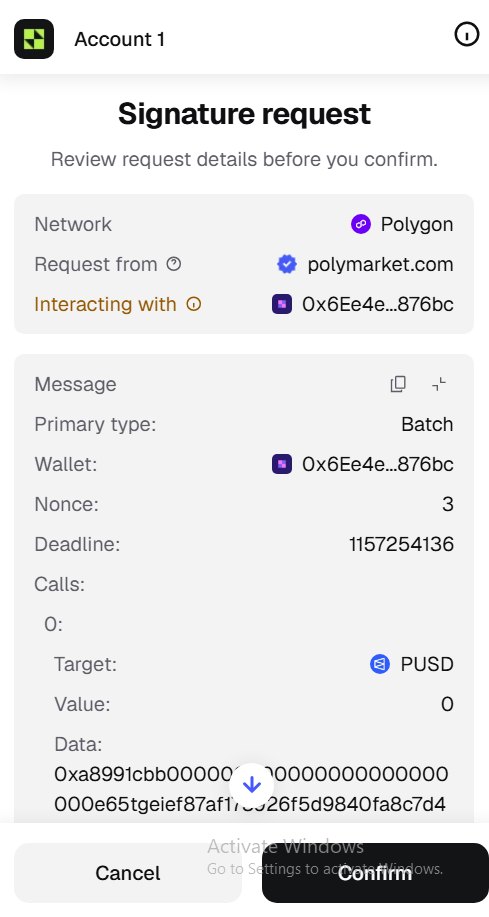
    Example wallet signature request on Polygon from polymarket.com, with a contract address shown under Interacting with.
    Example wallet request. Review the details in your own wallet before confirming.
  4. 4

    Use PolyPlay on Polymarket

    Once the wallet request is complete, PolyPlay appears on Polymarket. Any time you're on Polymarket, click the bookmarklet to open PolyPlay again.

Account Requirements

Your Polymarket account must have 5+ predictions to use PolyPlay.

New to Polymarket? Make 5 small trades first. This helps us prevent bot abuse.

Without 5+ predictions, you'll only see a demo mode with no functionality.
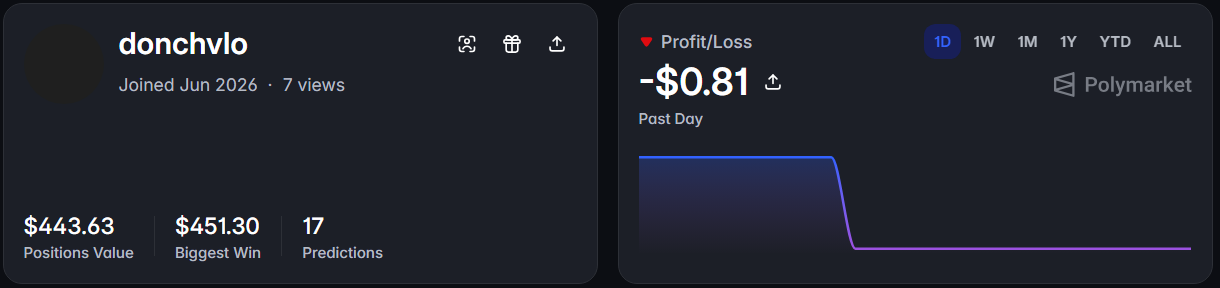
Example Polymarket account: donchvlo has 17 predictions, $443.63 positions value, a $451.30 biggest win and a past-day loss of $0.81.
Example: A Polymarket account with 17 predictions, ready to use PolyPlay.

Fear & Greed Index

Real time sentiment analysis of the entire Polymarket ecosystem.

  • Extreme Fear0–25
  • Fear26–45
  • Greed55–75
  • Extreme Greed75–100
Market sentiment

Pro Plan

  • All features unlocked
  • Priority support
  • Weekly Top Trader List
  • Advanced analytics

$39/mo

[email protected]

Stay Updated

Join our Telegram channel for the latest PolyPlay updates, feature drops, and announcements. Be the first to know.

Join Telegram

Support PolyPlay

PolyPlay is built by a solo developer handling all the code, while the rest of the team helps with design, research, and community. Any donation big or small goes a long way in keeping development alive and new features shipping.

SOLC5BSE8XwnJMqqciyyLEyX9kAYGkHWfDs4gmT68xzay3d
ETH0x57CFD72e34A0371fb826aCD8b8FB92ab27B59972
BTCbc1qpamd5wnvfrwfuqmcxrz4z3yvqc6csgmavsafag